
Part 3 of 4
Every Teams Meeting Is Becoming a Data Factory
Microsoft is converting daily conversation into recordings, transcripts, recaps and reusable corporate knowledge across OneDrive and SharePoint.
Companion Video
In This Part
- Recordings, transcripts, AI notes and recaps turn everyday meetings into permanent enterprise data.
- Those artifacts land across OneDrive and SharePoint, so they cannot be governed from team sites alone.
- The goal is not to keep every meeting, but to identify what deserves preservation, restriction or deletion.
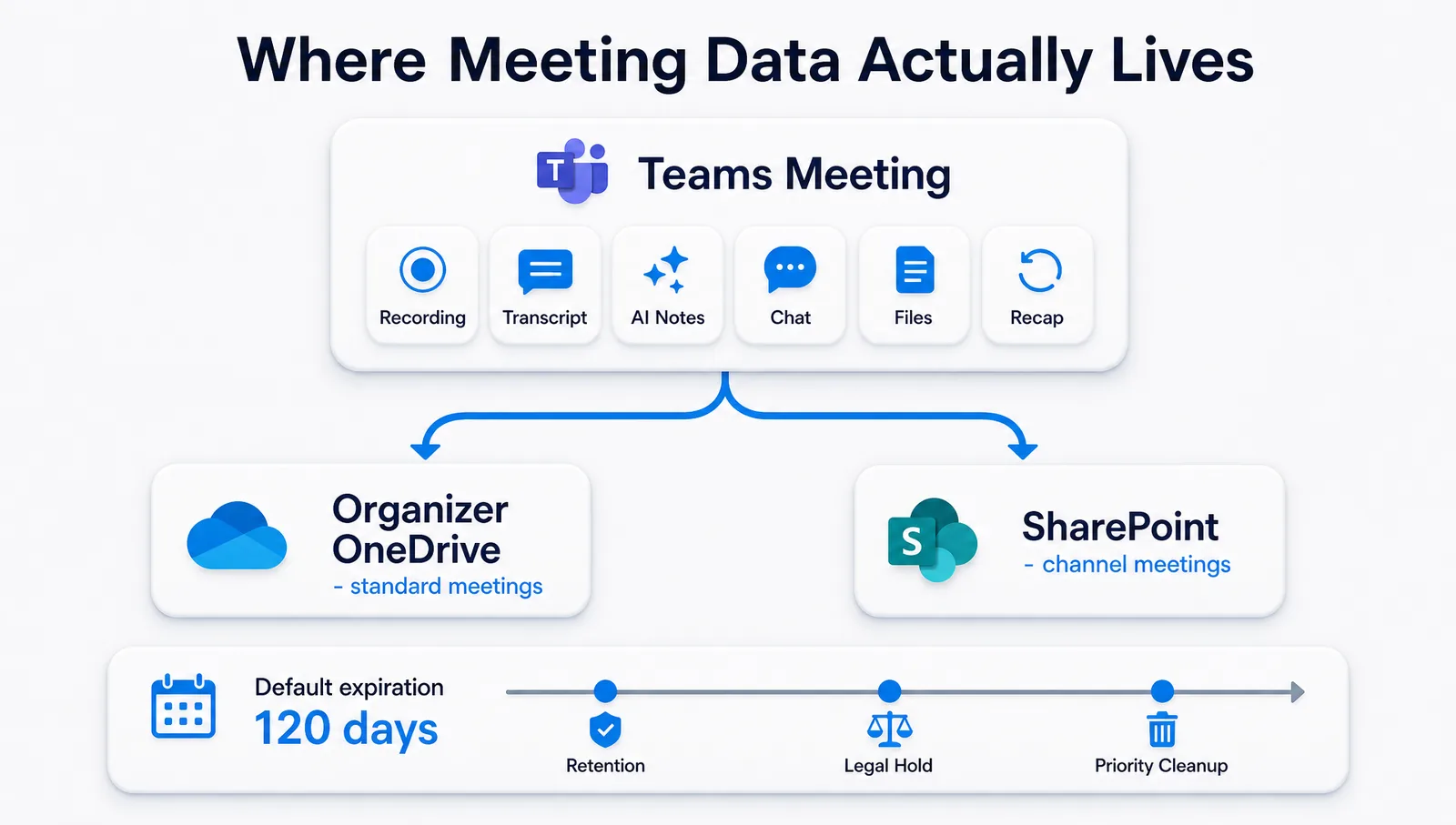
The meeting estate spans SharePoint and OneDrive. It cannot be governed from team sites alone.
A Teams meeting no longer ends when the participants leave. Depending on the meeting and Microsoft services in use, the conversation can produce:
- A video recording
- A searchable transcript
- AI-generated notes
- Meeting chat
- Shared files
- A Copilot recap
- Decisions and action items
- Follow-up content
- A reusable Copilot knowledge source
- Records subject to retention, eDiscovery and Legal Hold
Microsoft is creating a new enterprise data estate from the ordinary flow of work.
Where the Information Lives
Most Teams meeting recordings and transcripts are stored in the organizer's OneDrive. Recordings and transcripts from channel meetings are stored in SharePoint.
That distinction has immediate consequences. The storage location affects ownership, permissions, retention scope, employee-departure planning and Legal Hold. A customer cannot manage the complete meeting estate by reviewing SharePoint team sites alone. It must examine SharePoint and OneDrive together.
Microsoft also applies a default expiration period of 120 days to new meeting recordings and transcripts when automatic expiration is enabled. Administrators can change the period, but changes apply only to newly created recordings and transcripts.
That creates two opposite risks:
- Valuable institutional knowledge can disappear.
- Low-value or sensitive material can remain for years under broad retention.
The Meeting Is Becoming a Compound Knowledge Object
Microsoft has expanded Copilot Notebooks so that an individual Teams meeting can be used as a knowledge source. The Notebook can bring together the transcript, notes, chat and shared files associated with the meeting.
That means a meeting is no longer only a recording or transcript. It is a connected body of context that Copilot can revisit and analyze.
A single meeting can contain:
- The reasoning behind an executive decision
- A customer commitment
- A change in project scope
- Legal or compliance advice
- Product expertise
- A personnel discussion
- Financial forecasts
- Negotiating positions
- Intellectual property
Some of this material deserves preservation and reuse. Some should remain restricted. Much of it has limited continuing value.
Microsoft Is Already Addressing the Accumulation Problem
Microsoft's current Purview guidance specifically identifies stale Teams recordings and transcripts as a recurring Priority Cleanup use case.
Microsoft explains that Copilot recap regularly creates these files, that broad retention policies can retain them for years, and that many have little business value after one to three months. Priority Cleanup can identify and delete stale files, including files otherwise subject to retention, through a controlled approval process.
This confirms the scale of the issue. Microsoft is increasing the production and usefulness of meeting data while developing new controls to prevent the resulting estate from growing indefinitely. The enterprise still needs to distinguish valuable memory from disposable data.
How Zantaz Turns Meeting Data Into Trusted Knowledge
Zantaz brings read-only, tenant-wide visibility to meeting artifacts across SharePoint and OneDrive: meeting date and type, organizer and current owner, storage location, recording and transcript availability, age and expiration, retention and Legal Hold conditions, permissions and external exposure, sensitivity and classification, participant and business context, and Copilot availability.
Meeting Artifact Visibility
Identifies the condition of every meeting artifact across the tenant. Nothing is silently deleted, relabelled or moved.
Trusted Data Refinery
Classifies transcript content, identifies sensitive information and separates high-value meeting knowledge from routine material.
Trusted Data Collections
Preserves selected meetings, decisions, transcripts and supporting files as governed bodies of institutional knowledge.
Trusted Data Archive
Preserves material with legal, regulatory, contractual or enduring business value.
Trusted Data Portal
Routes recommended ownership, retention, archive or deletion decisions to the appropriate reviewers and operating platforms for approval and execution.
The goal is not to retain every meeting. The goal is to identify what the organization must preserve, what it should reuse, what Copilot should be permitted to reference, what requires restricted access, what can expire normally and what should be defensibly deleted.
Microsoft is turning enterprise conversation into enterprise data. Zantaz turns selected meeting data into trusted institutional knowledge.
Verified Foundation
- Standard meeting artifacts generally reside in the organizer's OneDrive; channel-meeting artifacts reside in SharePoint.
- The default expiration is 120 days when automatic expiration is enabled.
- Purview retention must include the relevant OneDrive, SharePoint or Microsoft 365 Group location based on the meeting type.
- Microsoft explicitly identifies recurring cleanup of stale Teams recordings and transcripts as a Priority Cleanup use case.
- The Teams Meeting Intelligence Lens is a recommended new Zantaz capability. It should not be presented as currently deployed.
Next in the Playbook
Microsoft is expanding the data estate by creating new content and capturing daily conversation. Part Four examines the third expansion: Copilot is making previously dark SharePoint content visible and usable to AI.
Read Part 4: Copilot Is Waking Up SharePoint's Dark DataSee what Microsoft's SharePoint expansion means for your enterprise data estate.